
Learn what Odoo Light Users can do, who should use them, and how they can lower your Odoo licence costs.
An Odoo Light User is a cheaper user type in Odoo 20 for employees who use Odoo for their own daily tasks, not to run the business. It gives staff the basic employee tools they need without paying for a full user licence.
Full Odoo users work in apps such as Sales, Purchase and Accounting. Light Users only get access to employee features, such as time off, expenses, attendance, planning and barcode scanning.
Odoo counts two kinds of Light Users:
The Light User type launched with Odoo 20.
Businesses need Odoo Light Users because not every employee needs full access to Odoo. Before Odoo 20, a warehouse worker who only scanned barcodes cost the same as a sales manager.
With Light Users, companies can:
Light Users help most in companies with many frontline staff, such as retail chains, hotels, factories and field-service companies.
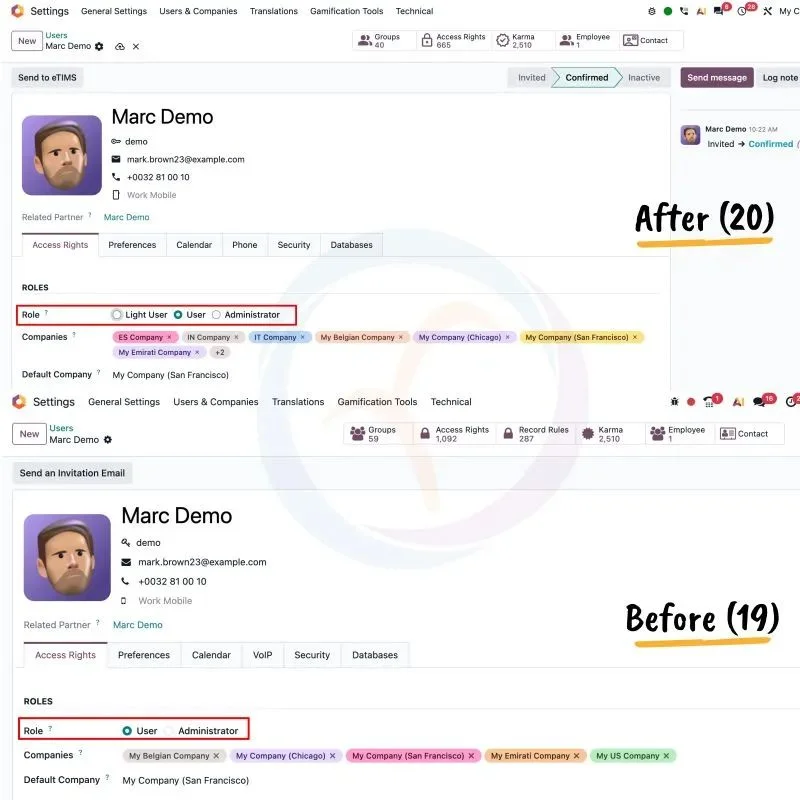
An Odoo Light User can handle their own employee tasks in Odoo 20.
With a Light login, employees can:
Without a login, employees can:
Learn more about Odoo HR software, Odoo Point of Sale and Odoo attendance with ZKTeco machines.
An Odoo Light User cannot work in Odoo’s main business apps. This means no access to:
Light Users also cannot use Odoo Studio, the API or system settings.
If an admin gives a Light User any extra access, Odoo changes them to a full User automatically, and they are billed at the full price.
To pay the Odoo Light User price, a company needs two things:
If either one is missing, Odoo bills all users at the Standard or Custom price.
Yes. In Odoo 20, any active employee record that is not linked to a user account counts as a Light User. This means employees who never log in can still add to your Odoo bill.
To avoid paying for people you don’t need:
Not exactly. A POS employee login lets cashiers open the till with a PIN or badge, without a full Odoo account. In Odoo 20, that employee still counts as a Light User.
| Employee | Best option |
|---|---|
| Cashier who only uses the till | Employee record with a PIN or badge |
| Cashier who also requests leave or checks shifts | Light User with a login |
| Store manager who manages stock and reports | Full Odoo User |
In September 2026, Odoo changed its prices for the first time since 2022 and added Light Users.
| Plan | What changed |
|---|---|
| One App Free | No change |
| Standard | No change |
| Custom | 20% increase from September 24, 2026 |
| Light User | New, cheaper user type |
Existing users keep the renewal terms in their contract. The new Custom price applies to new users. See our Odoo pricing guide for full plan details.
Odoo Light Users can cut licence costs by about half when most staff only need basic features. Here is an example for a company with 200 employees, where 40 people run core processes.
| Setup | Calculation | Cost per month |
|---|---|---|
| All 200 as full users | 200 × US$24.90 | US$4,980 |
| 40 full users + 160 Light Users | (40 × US$24.90) + (160 × US$8.90) | US$2,420 |
| Saving | US$2,560 per month |
Light Users get employee features only. Standard users get all Odoo apps. Custom users also get advanced tools like Studio and the API.
| Feature | Light | Standard | Custom |
|---|---|---|---|
| Time off, expenses, attendance | Yes | Yes | Yes |
| Planning and Field Service | Yes | Yes | Yes |
| Barcode scanning | Yes | Yes | Yes |
| Knowledge | Read only | Full | Full |
| Sales, Purchase, Project, Accounting | No | Yes | Yes |
| Inventory and Manufacturing management | No | Yes | Yes |
| Odoo Studio and API | No | No | Yes |
| Multi-company | No | No | Yes |
| Odoo.sh or on-premise | No | No | Yes |
An employee should be an Odoo Light User if they only use Odoo for their own tasks. Ask these questions for each role:
Odoo Light Users are a good fit for staff who work away from a desk:
Partly. An Odoo Light User can scan barcodes in the warehouse and use the Manufacturing Shop Floor. A Light User cannot create products, change stock settings or plan manufacturing orders. Those tasks need a full Odoo User. For scanner setup, see our barcode scanner integration services.
You can create an Odoo Light User in four steps:
If the Role changes to User, you gave extra access. Remove it to keep the Light price.
Not yet for most companies. Odoo 20 is available now for new databases on Odoo Online and Odoo.sh. Upgrades for existing databases are expected by the end of November 2026. Until then, existing customers keep paying Standard or Custom prices.
Yes. Odoo Community 20 also has the Light role. But it only limits access, it doesn’t save money, because Odoo Community is free and has no user licences.
Before your Odoo renewal, check these points to avoid paying too much:
An Odoo Light User is a cheaper Odoo 20 user type for employees who only need basic features, such as time off, expenses, attendance, planning and barcode scanning. Light Users cannot use Sales, Purchase, Project or Accounting.
An Odoo Light User costs about a third of a Standard user. The price depends on your country. For example, it is around EUR 7.90 in Europe and US$5.90 to US$8.90 in other markets.
Yes. Odoo Light Users are only available on Odoo 20 or later, and you also need to sign the new Odoo Enterprise Agreement.
A Light User can only use employee features. A Standard User can use all Odoo apps, including Sales, Purchase, Inventory and Accounting.
Yes. In Odoo 20, every active employee record without a linked user counts as a Light User. Archive former staff to avoid extra costs.
Odoo changes a Light User to a full User when you give them extra access, such as Sales. Remove the extra access to switch them back to Light.
Yes. The Odoo Custom plan went up by 20% on September 24, 2026. The Standard plan and One App Free did not change.
No. Approving other people’s requests is a manager task. Managers who approve requests need a full Odoo User licence.
Upgrades for existing Odoo databases are expected by the end of November 2026. New databases can start on Odoo 20 now.