Inventory optimization is an essential function across all industries today. Any excess or shortage of inventory within the supply chain can impact the availability of products and services for customers. Therefore, monitoring and balancing inventory levels with supply and demand dynamics is crucial.
8 Reports. One Powerful Module.
Inventory Turnover Analysis Report
Measures how frequently a business sells and restocks its inventory over a given timeframe, helping teams make sharper purchasing and replenishment decisions.
Inventory FSN Analysis Report
Classifies every inventory item by movement frequency into three groups: fast-moving, slow-moving, and non-moving, giving you a clear picture of what's active and what's stagnant.
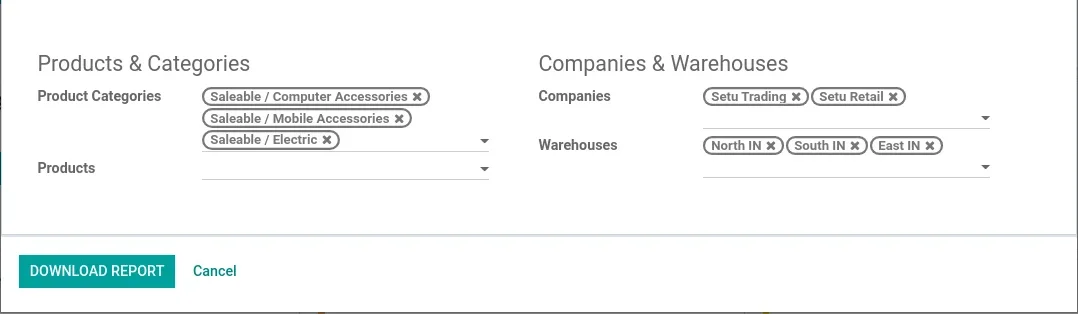
Inventory XYZ Analysis Report
Segments current stock by total value to help prioritize control efforts and reduce unnecessary carrying costs across your warehouse.
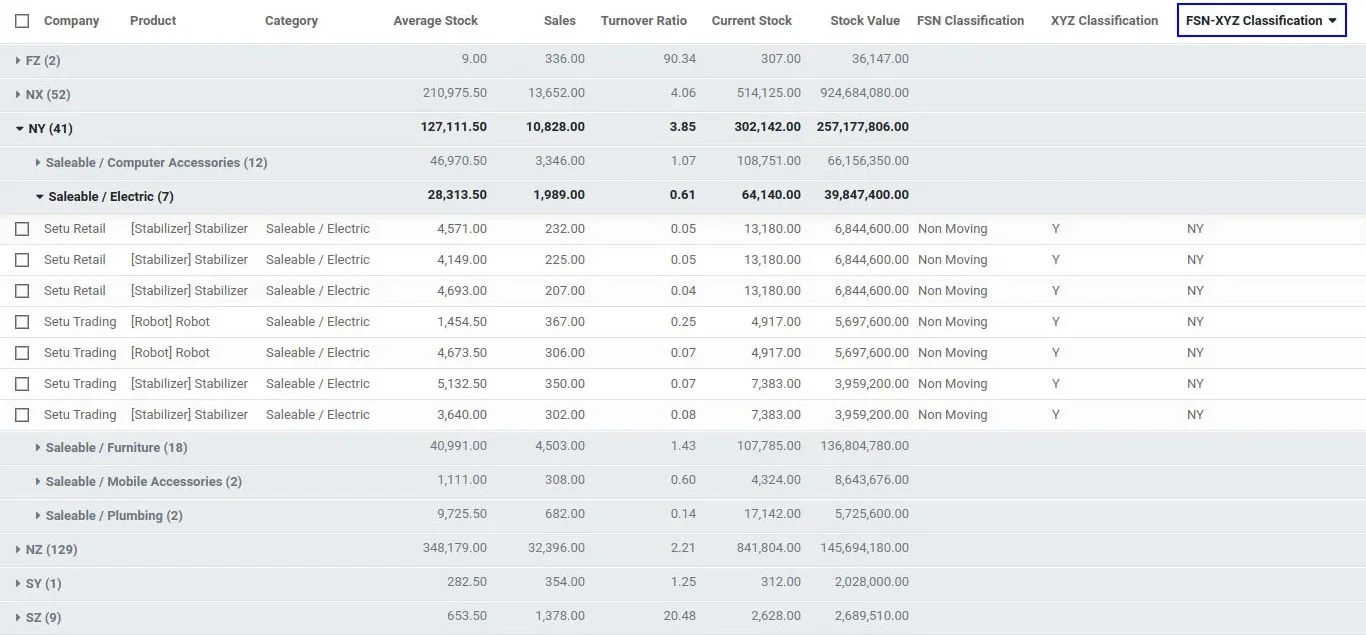
Inventory FSN-XYZ Combined Analysis Report
Merges two classification methods into one view, enabling targeted sales strategies to unblock and liquidate idle inventory before it becomes a financial drag.
Inventory Age & Age Breakdown Analysis Report
Shows exactly how long each item has been sitting in your warehouse since receipt, so you can act on slow-moving stock before storage costs pile up.
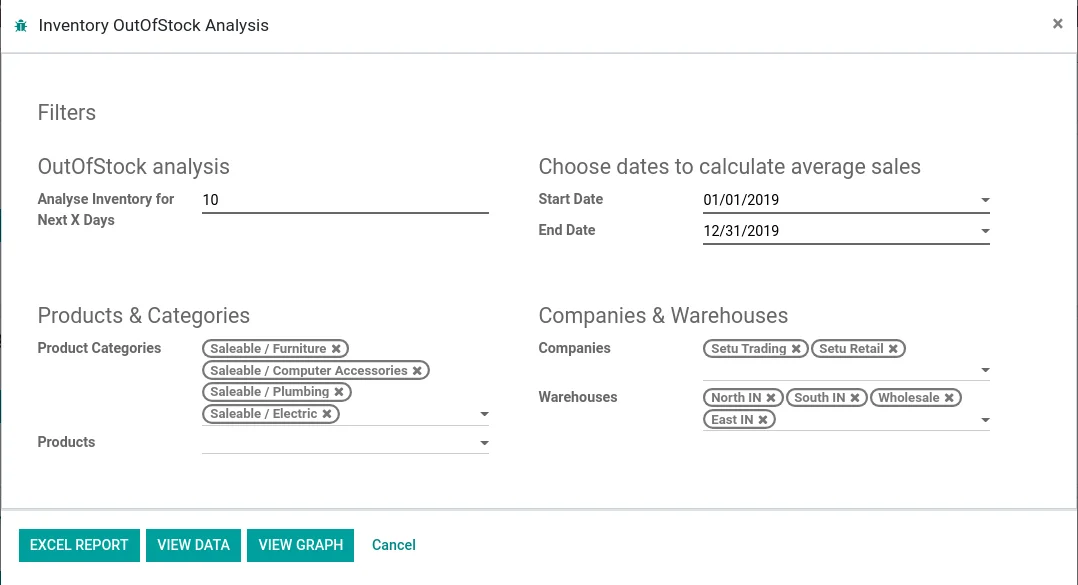
Inventory Out of Stock Report
Identifies which products are heading toward a stockout based on their movement history, and shows how many days of stock remain to meet upcoming sales demand.
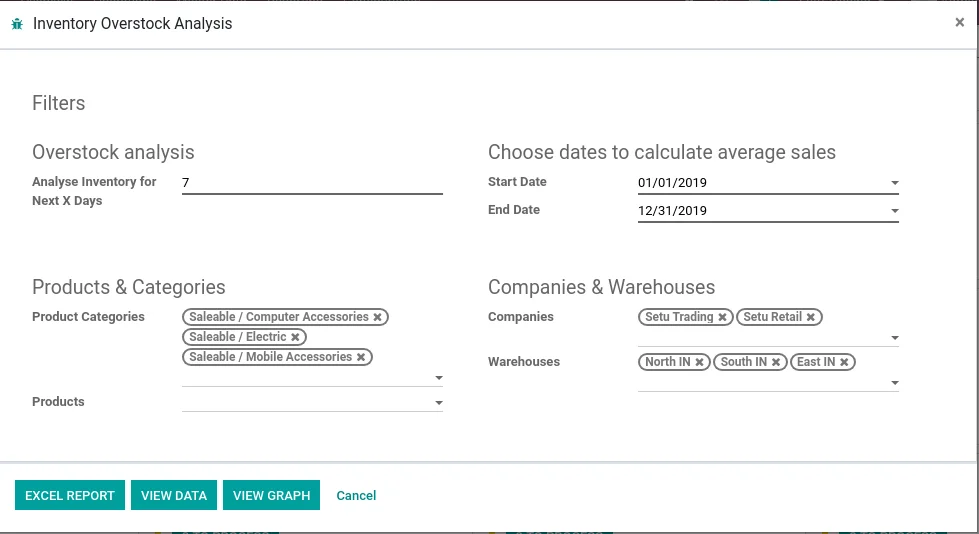
Inventory Overstock Report
Pinpoints products ordered in excess of actual demand, helping prevent capital lock-up and unnecessary carrying costs while applying FSN and XYZ classifications to existing surplus.
Inventory Stock Movement Report
Delivers a full audit trail of every inventory movement across all warehouses and companies, trackable between any two dates or up to a specific cutoff.
Advance Inventory Analysis Reports
Explore what each Advanced Inventory Reportsfor Odoo module has to offer:
Turnover Analysis
FSN Analysis
XYZ Analysis
FSN-XYZ
Inventory Ageing
Out of Stock
Overstock
Stock Rotation
Inventory Turnover Analysis Report
Inventory turnover is a ratio reflecting how many times a business has sold and replenished its inventory within a defined period. Measuring this metric enables companies to make more informed purchasing and stocking decisions.
Importance of Turnover Analysis
Turning inventory into cash: Inventory holds critical capital that could otherwise generate profit. Analyzing turnover by product helps identify ways to accelerate inventory movement.
Identifying demand uncertainty: Shifts in demand directly impact profitability. A sharp decline ties up cash in unneeded stock; a sharp rise without sufficient inventory causes missed revenue. Managing demand uncertainty is essential for maximizing utilization and profit.
Assessing holding risk: The turnover ratio reveals whether funds are allocated to the right products. Monitoring this ratio is key to tracking and mitigating inventory risk.
Preventing overstocking: Excess stock immobilizes capital and reduces business agility. Avoiding overstock situations is vital to maintaining financial health.
Advantages of Turnover Analysis
Price stability: Moving inventory quickly supports consistent pricing in the market.
Fresh product availability: Efficient selling keeps new products flowing in and helps rotate items across display areas for returning customers.
Reduced waste: High turnover limits exposure to losses from perishable or date-sensitive items.
Inventory FSN Analysis Report
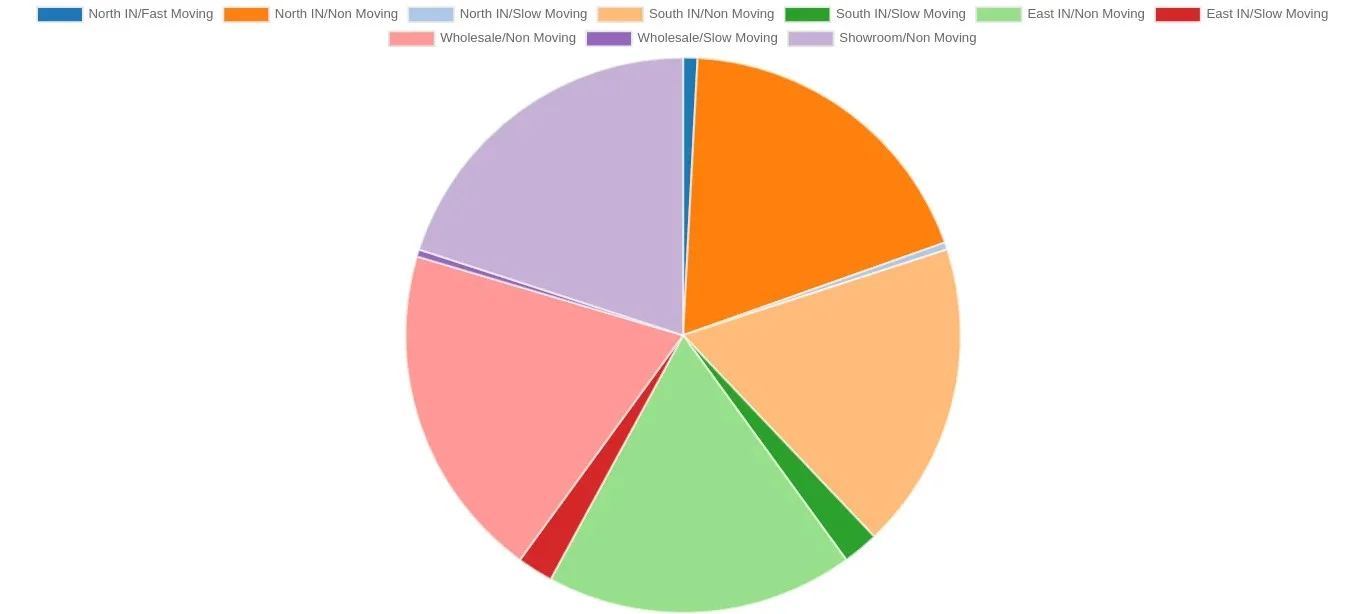
FSN categorizes inventory into fast-moving, slow-moving, and non-moving items, examining quantity, consumption rate, and issue frequency. It supports better stock arrangement, distribution, and handling with the primary goal of minimizing inventory obsolescence. In rapidly evolving technology environments, this classification requires more frequent updates.
FSN analysis is grounded in the stock turnover ratio, the ratio of a material's annual consumption to its average inventory level. Items fall into three categories:
Item Classifications
Fast-moving (F): Items with a stock turnover ratio above 3.
Slow-moving (S): Items with a stock turnover ratio between 1 and 3.
Non-moving (N): Items with a stock turnover ratio below 1.
Advantages of FSN Analysis
Identifies dead stock and fast-moving inventory clearly.
Highlights which items remain active within your inventory.
Supports smarter procurement decisions aligned with actual demand.
Filterable by company, category, warehouse, and product.
Reports are exportable in Excel format.
Inventory XYZ Analysis Report
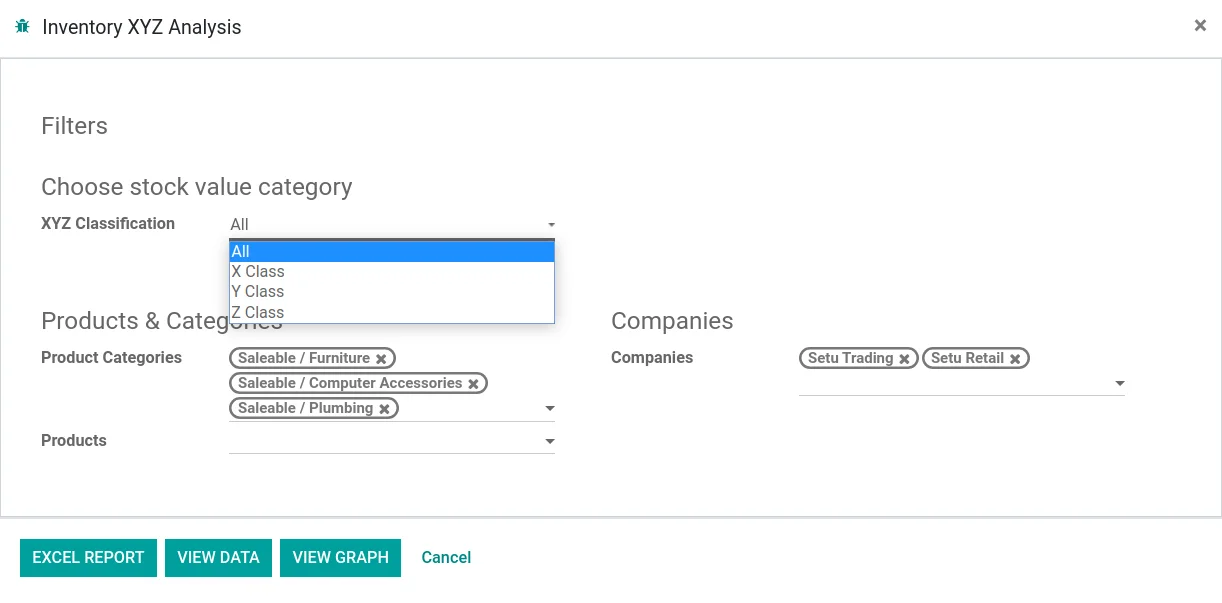
XYZ Analysis evaluates current inventory based on total value. It classifies stock into three tiers reflecting each item's financial contribution to the overall inventory. This analysis applies only to stock on hand at the current date and is not available for historical periods.
Value-Based Classification
X Class: Top 70% of total inventory value, highest investment items.
Y Class: Next 20% of total inventory value, moderate investment items.
Z Class: Remaining 10% of total inventory value, lowest investment items.
Advantages of XYZ Analysis
Provides a clear picture of where inventory investment is concentrated.
Helps determine which items require dedicated sales strategies.
Guides the level of monitoring and control appropriate for each item.
High-value items receive close oversight and strict controls.
Mid-range items are managed with standard procedures and periodic reviews.
Low-value items may require minimal control and can be issued as forward stock.
Company-level reporting with filters for categories and products.
Reports are exportable in Excel format.
Inventory FSN-XYZ Combined Analysis Report
Not all inventory items are consumed with equal regularity. Some materials are needed continuously, others occasionally, and some have not been requested in years. Combining XYZ with FSN analysis enables more targeted strategies, guiding specific decisions around stock disposal and improving the company's capital position.
For example, a non-moving item classified as X (high value) signals an immediate disposal opportunity. Selling off such stock frees warehouse space and releases tied-up capital.
Advantages of FSN-XYZ Combined Analysis
Enables more precise and targeted inventory management strategies.
Quickly surfaces dead stock and frozen investment.
Clarifies appropriate service levels for items with unpredictable demand.
Reduces the risk of stock becoming obsolete.
Improves the accuracy of demand forecasting.
Minimizes stockouts, which in turn improves production efficiency and customer satisfaction.
Company-level separate reporting with filters for categories and products.
Reports are exportable in Excel format.
Inventory Age & Age Breakdown Analysis Report
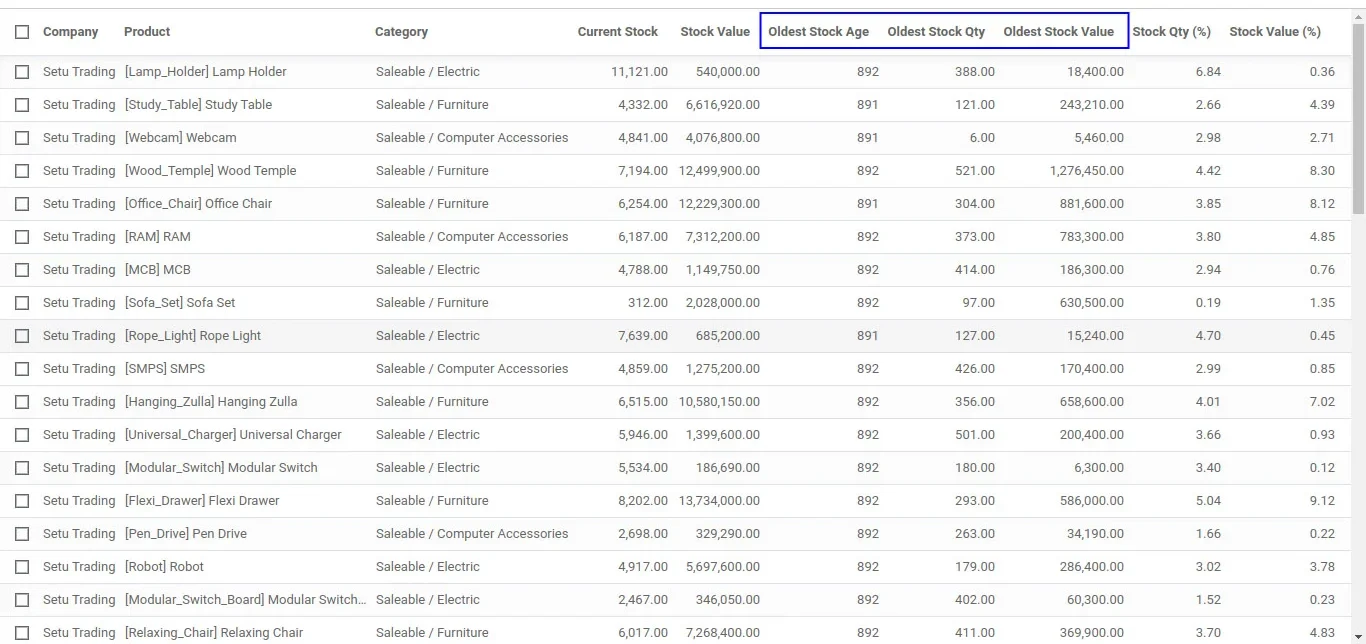
Inventory ageing reports indicate how long each item has remained in stock based on its receipt date. This insight enables smarter decisions around purchasing volumes and timing. Identifying stock levels and age is essential for refining purchasing strategies and developing targeted sales plans.
An inventory ageing report groups on-hand items by the duration they have been held, helping identify slow-moving stock and the additional costs incurred to store and preserve these products until sold.
Advantages of Age & Age Breakdown Analysis
Directs attention to the slowest-moving items in your inventory.
Improves decision-making around purchase timing and order quantities.
Helps reduce storage costs required to maintain product quality over time.
Enables benchmarking of inventory dwell time against industry standards.
Facilitates comparison of inventory control performance across divisions or competitors.
Stock age data is available in graphical and list view formats for flexible analysis.
Company-level separate reporting with filters for categories and products.
Reports are exportable in Excel format.
Inventory Out Of Stock Analysis Report
Stockouts rank among the most damaging events for retailers, not just in lost revenue, but in reduced customer satisfaction and loyalty. This report helps you analyze how many products are at risk of running out, identify required restock quantities, and apply FSN classification to determine whether replenishing each item is truly worthwhile.
Advantages of Out Of Stock Analysis
Measures how many days of inventory coverage remain for each product.
Strengthens and streamlines the reordering process.
Identifies future demand periods where stock will be insufficient.
Calculates the cash flow needed to replenish out-of-stock items.
Uses FSN classification to determine which products are worth restocking.
Supports more accurate and forward-looking inventory forecasting.
Separate reporting by warehouse with filters for companies, categories, and products.
Reports are exportable in Excel format.
Inventory Overstock Analysis Report
Excess inventory is a serious burden. It locks up capital and can inflict significant losses, particularly when inactive items accumulate unchecked. This report helps you avoid over-ordering by surfacing surplus stock early, while also applying XYZ and FSN classifications to your existing inventory for deeper strategic insight.
Advantages of Inventory Overstock Analysis
Combined FSN-XYZ overstock reporting clearly identifies dead investment.
Evaluates the accuracy of past stock forecasting decisions.
Provides product-level inventory value and its share of total inventory.
Flags items requiring close monitoring and tighter controls.
Supports improved reorder planning and procurement efficiency.
Separate reporting by warehouse with filters for companies, categories, and products.
Reports are exportable in Excel format.
Inventory Movement Analysis Report
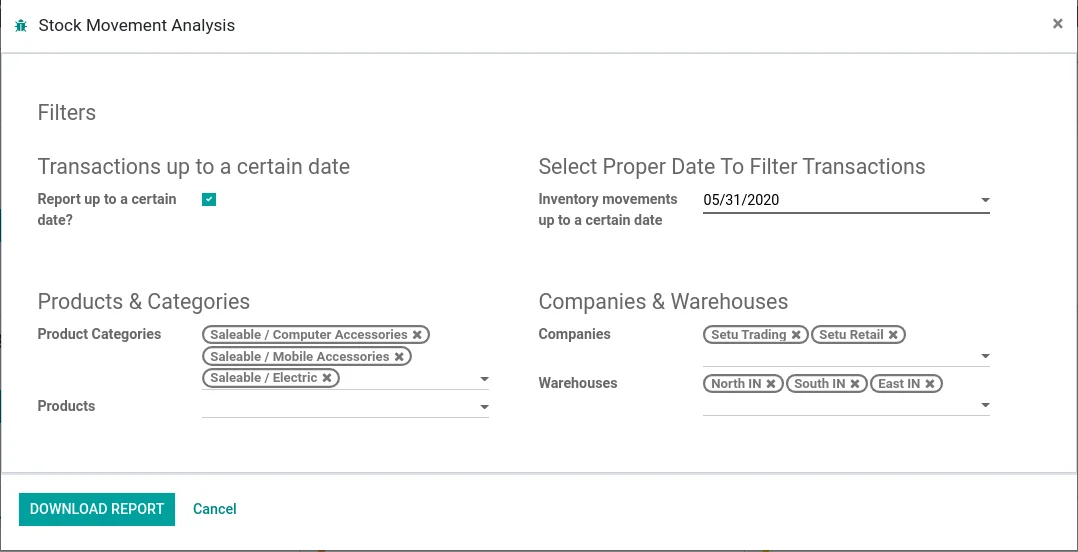
Tracking inventory movements across a large product catalogue or high-frequency transaction environment can be complex. This report provides a comprehensive view of stock activity for any defined period or up to a specific date, across all products and warehouses. Users can filter by product category, product, company, and warehouse.
Report Highlights
Opening Stock: Displays the calculated beginning balance for each product at the start of the selected period.
Purchase & Purchase Returns: Total quantity purchased and returned within the defined period.
Sales & Sales Returns: Total quantity sold and returned within the defined period.
Internal Transactions (In/Out): Tracks all internal stock movements in and out.
Inventory Adjustments (In/Out): Captures stock adjustment entries both incoming and outgoing.
Transit Transactions (In/Out): Tracks goods in transit, inbound and outbound.
Production Tracking (In/Out): Records production output quantities and raw material consumption.
Closing Stock: Displays the calculated ending balance for the defined period.
Key Features
Generate reports between specific dates or up to any chosen date.
All transaction types are captured with accurate opening and closing balances.
Always reflects a true calculated opening and closing inventory position.
All IN and OUT movements are separately visible within the report.
Warehouse-level separate reporting.
Filterable by company, category, warehouse, and product.
Reports are downloadable in a well-structured Excel format.
Talk to our Experts to find out how our consulting and technology can transform your business.